How Much Internet Speed Do You Need for IPTV? Full Broadband Guide (UK 2026)
How Much Internet Speed Do You Need for IPTV? Full Broadband Guide (UK 2026)
Updated: October 2026
Before signing up for any IPTV service, the single most important question isn’t which provider has the most channels — it’s whether your internet connection can actually support it. A great provider on a weak connection will still buffer. A modest provider on a strong, stable connection often performs beautifully. This guide breaks down exactly what speed you need for different streaming qualities, how UK broadband providers compare, how to check your current connection properly, what actually causes most buffering issues, and what to do if your broadband falls short.
Minimum Speed Requirements by Streaming Quality
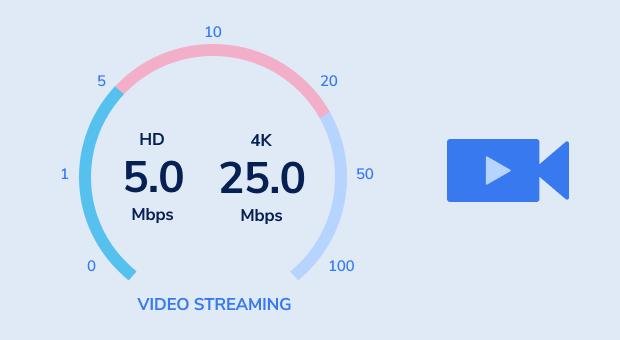
IPTV needs a stable connection more than a fast one — but you still need a baseline. Here’s what each quality level realistically requires:
| Quality | Minimum Speed | Recommended Speed |
|---|---|---|
| SD (Standard Definition) | 5 Mbps | 8 Mbps |
| HD (1080p) | 10 Mbps | 15 Mbps |
| 4K / Live Sports | 25 Mbps | 50 Mbps+ |
| Multiple devices streaming simultaneously | +10 Mbps per extra screen | — |
Live sports deserve special mention here — unlike on-demand content, a live stream can’t buffer ahead of time, so any dip in your connection shows up immediately as freezing or pixelation during the exact moment you don’t want it (a match-winning goal, for instance). If football is your main reason for switching to IPTV, our guide on watching Premier League without Sky covers sport-specific reliability in more depth, and our deeper technical breakdown — why IPTV freezes during live sports — explains the less obvious causes most people overlook.
How to Check Your Actual Speed Properly
- Go to speedtest.net on the same device you’ll be streaming on — not a different laptop or phone, since results can vary by device
- Run the test at least three times: morning, evening, and during your usual peak viewing hours (typically 7–10 PM)
- Test both Wi-Fi and, if possible, a direct Ethernet connection to compare the difference
- If your results vary by more than 20% between tests, your connection is unstable — this matters more than the average speed itself
A connection that averages 40 Mbps but regularly drops to 10 Mbps during evenings will cause more buffering than a stable 20 Mbps line. Consistency is what IPTV actually depends on, which is also why a single “my internet is 100 Mbps” claim doesn’t guarantee a smooth experience if that speed isn’t consistent at the times you actually watch.
How UK Broadband Providers Typically Compare
Speed availability varies significantly by area and provider in the UK. As a general guide in 2026:
- Standard ADSL/copper broadband — often 10–20 Mbps, which can work for SD/HD but struggles with 4K or multiple simultaneous streams
- Fibre-to-the-cabinet (FTTC) — typically 35–70 Mbps, comfortable for HD and most 4K use
- Full fibre (FTTP) — commonly 100–900 Mbps+, more than enough headroom for 4K, live sports, and multiple devices at once, with the added benefit of much more consistent evening performance
If you’re unsure which type you have, your provider’s app or a quick look at your router model usually confirms it. If you’re on older ADSL and experiencing regular buffering, a fibre upgrade — even a modest one — often resolves issues that no amount of app settings or device changes can fix.
Wi-Fi vs Wired Ethernet: Does It Really Matter?
Yes — significantly, and it’s one of the most underrated fixes. Wi-Fi, especially on the 2.4GHz band, is prone to interference from walls, microwaves, neighbouring networks, and even other smart home devices. For any serious IPTV setup, especially on Firestick or Smart TV:
- Use wired Ethernet wherever possible — this single change eliminates the majority of buffering issues for most users, often more than any speed upgrade would
- If Wi-Fi is your only option, use 5GHz instead of 2.4GHz for noticeably better stability and speed, though 5GHz has shorter range through walls
- Position your router centrally and avoid thick walls, metal objects, or long distances between router and streaming device
- Consider a mesh Wi-Fi system if your home is large or has several dead zones — this often solves issues that look like “slow internet” but are actually weak signal coverage
- Use a USB-C Ethernet adapter on Firestick models that don’t have a built-in port — a small, inexpensive fix that makes a disproportionately large difference
For device-specific setup tips, see our guides on setting up IPTV on Samsung and LG Smart TVs, our full ultimate Firestick IPTV setup guide, or general buffering fixes for Firestick and Smart TV. If you’re specifically using IPTV Smarters and running into connection problems, our dedicated troubleshooting guide — IPTV Smarters not working: complete fix guide — covers app-specific causes separate from your internet connection itself.
How Much Data Does IPTV Actually Use?
If you’re on a capped or limited broadband plan, data usage matters. Rough estimates per hour of streaming:
| Quality | Data Usage Per Hour |
|---|---|
| SD | ~0.7 GB |
| HD (1080p) | ~1.5–3 GB |
| 4K | ~7–10 GB |
A household watching 4–5 hours of HD content daily could use roughly 200–450 GB a month. Most UK fibre broadband plans are unlimited, but it’s worth checking your specific plan if you’re on an older ADSL connection or a capped mobile broadband package. Multi-device households — say, one TV streaming 4K sport while a phone streams HD elsewhere in the house — should budget for substantially more.
Does ISP Throttling Affect IPTV?
Some UK internet providers apply traffic management during peak hours, which can affect streaming performance even when your advertised speed looks fine. Signs of throttling include buffering that consistently happens at the same time each evening regardless of what you’re watching, or speed tests that look fine but actual streaming still struggles. A VPN can sometimes help bypass this kind of throttling, though it isn’t guaranteed and can introduce its own slowdown depending on server distance — worth testing both ways if you suspect throttling is the issue.
What If Your Broadband Isn’t Fast Enough?
A few practical options if your current speed falls short of the recommended range:
- Stick to HD instead of 4K — most content still looks excellent at 1080p, and it requires a fraction of the bandwidth
- Upgrade your broadband package — in most UK areas, fibre broadband upgrades are affordable and often cheaper than people expect, especially with full fibre rollout continuing across the country in 2026
- Reduce simultaneous streams — if multiple devices are streaming at once in your household, that’s often the real bottleneck rather than your base speed
- Switch to wired Ethernet before assuming you need a speed upgrade at all — this alone often resolves issues attributed to “slow internet”
- Restart your router weekly — a surprisingly common fix for connections that slowly degrade over days of continuous uptime
Testing Your Connection With a Real IPTV Trial
Speed test numbers only tell part of the story — the real test is how your connection performs with actual IPTV streaming, especially during peak hours. Max Streaming IPTV offers a free 24-hour trial with no card required, so you can test real performance on your own connection before committing to any plan. For a full list of what to check during that trial, see our free trial testing checklist, and if you’re comparing the trial experience against paying upfront, our guide on free trial vs paid subscription explains why testing first is almost always the smarter approach.
Once you’re ready to commit, our step-by-step guide to buying an IPTV subscription walks through the full process from trial to setup.
Comparing Broadband Needs: IPTV vs Traditional Cable
One advantage of satellite TV like Sky is that it doesn’t rely on your home broadband at all — but that comes with its own costs and contract trade-offs. If you’re weighing up whether the broadband requirement is worth it compared to sticking with cable, our full comparison covers this in detail: IPTV vs Sky & Virgin Media UK 2026. And once your connection is confirmed stable, it’s worth checking exactly what you’ll get channel-wise — our full UK channel list breakdown covers sports, movies, kids’ and international content in detail.
Frequently Asked Questions
What’s the minimum speed for basic IPTV use?
5–8 Mbps for SD quality, though 15 Mbps or higher is recommended for a genuinely smooth HD experience.
Can I use IPTV on mobile data?
Yes, if your data plan supports it and speeds are sufficient — but be mindful of data caps, since 4K streaming can use 7–10 GB per hour.
Does a VPN slow down my IPTV speed?
It can, depending on the VPN server and distance. If you use a VPN and notice buffering, try disabling it temporarily to isolate the cause.
Is fibre broadband necessary for IPTV?
Not strictly necessary, but it makes a noticeable difference for 4K and live sports. Standard broadband can work fine for HD if your connection is stable.
Why does my connection test fast but IPTV still buffers?
This usually points to instability rather than raw speed — Wi-Fi interference, ISP throttling during peak hours, or an overloaded router are common causes. Testing with wired Ethernet quickly isolates whether it’s your connection or something else.
For more setup and troubleshooting questions, see our FAQ page.
Final Thoughts
Your internet connection is the real foundation of a good IPTV experience — more important, in many cases, than which provider you choose. Test your actual speed properly, prioritise a stable wired connection where possible, understand how your specific broadband type compares, and match your expectations (SD, HD, or 4K) to what your connection can realistically support.
Ready to test how your connection performs? Request a free 24-hour trial on WhatsApp or view our current pricing plans.
Need help choosing a plan?
Message us on WhatsApp and we will set you up.
Chat on WhatsApp See pricingRelated: Services · Devices · Setup guides